
The password manager KeePass comes in English by default. If you’d rather use it in another language, for example German, you can add it with a separate translation file. All you have to do is download the language file for your language and your KeePass version from the KeePass “Translations” page. Most likely you have version 2 or newer. If you’re not sure, you can look it up in the menu under “Help” by clicking “About KeePass”.
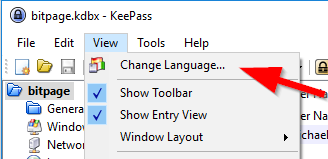
Once the download is done, it’s best to open KeePass and put the unpacked language file in the place KeePass expects it. The easiest way to find that place is to click “View” and then “Change Language” in the KeePass menu.
The new dialog that opens has an “Open Folder” button at the bottom. Clicking it opens Windows Explorer with the “Languages” folder, and you simply copy your language file there from your download location, for German that’s “German.lngx”. If you close the “Select Language” dialog and open it again, KeePass already recognizes the new language file and offers it for selection.
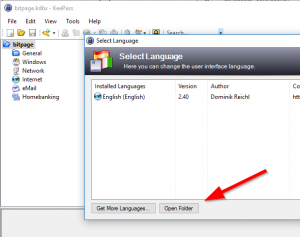
Double-click your language, for example “German (Deutsch)”, to switch, and KeePass will let you know that the change takes effect once KeePass is restarted. After that, the program greets you in your chosen language. Done! Switching back works the same way: just pick “English (English)” in the same dialog.
Update 2026: According to the translations page, the steps are still the same in the current KeePass 2.61. The downloads there are labeled with the minimum KeePass version they work with, for example [2.61+], so make sure your KeePass is at least that version if your language file doesn’t show up.
As a developer, I personally would have solved this differently and shipped a few of the most widely spoken languages with the software, but I can also understand wanting to keep the core software lean. That it’s less intuitive, though, is shown by how often the German version of this blog post has been read: around 7,000 times by different visitors already (as of April 22, 2020).
This post is also available in:  Deutsch
