
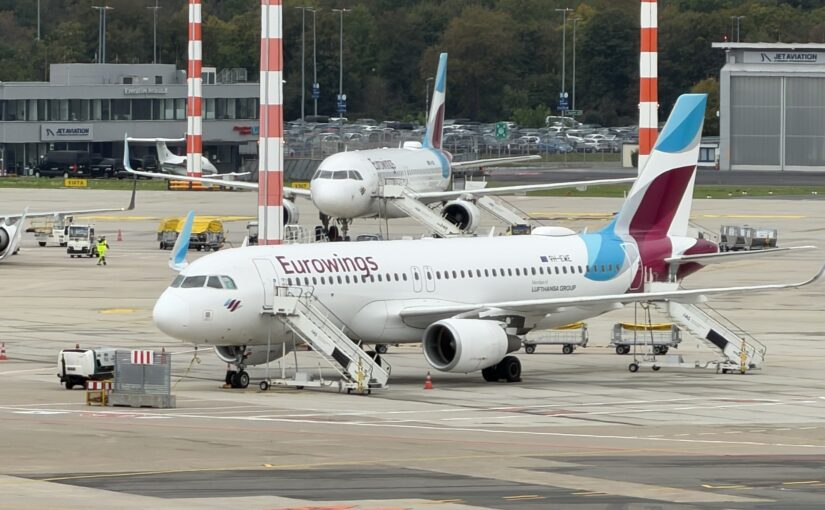
Wings Connect has been around for a few years now, and I find the idea of being online above the clouds fascinating. Satellites shuttle data packets back and forth across thousands of kilometers. The amazement (and envy) in the WhatsApp group chat is real when you casually mention that you are currently cruising at 33,000 feet. Every now and then there are outages, though, and here and there a packet gets lost on its long journey. The browser then grinds away endlessly. So I wanted to know what the numbers actually look like: How many megabits of download and upload do you really get? How high is the latency?
How the measurements were done
Claude Opus was kind enough to put together a test script back in March, refined in October, so my laptop ran a measurement round every two minutes: ping to Google’s 8.8.8.8 and Cloudflare’s 1.1.1.1, DNS resolution, response times for page loads, and bandwidth via Cloudflare’s speed test. The really cool part: the inflight portal has a small API for the moving map that provides altitude, position, speed and even the flight phase. The Bash script ties every measurement to this data, so every dropout can be matched to a position on the map afterwards. The scripts, raw data and full reports are on GitHub, so you can retrace my measurements or run them yourself. A quick transparency note: I paid for the Wi-Fi package myself, and Eurowings knows nothing about this test.
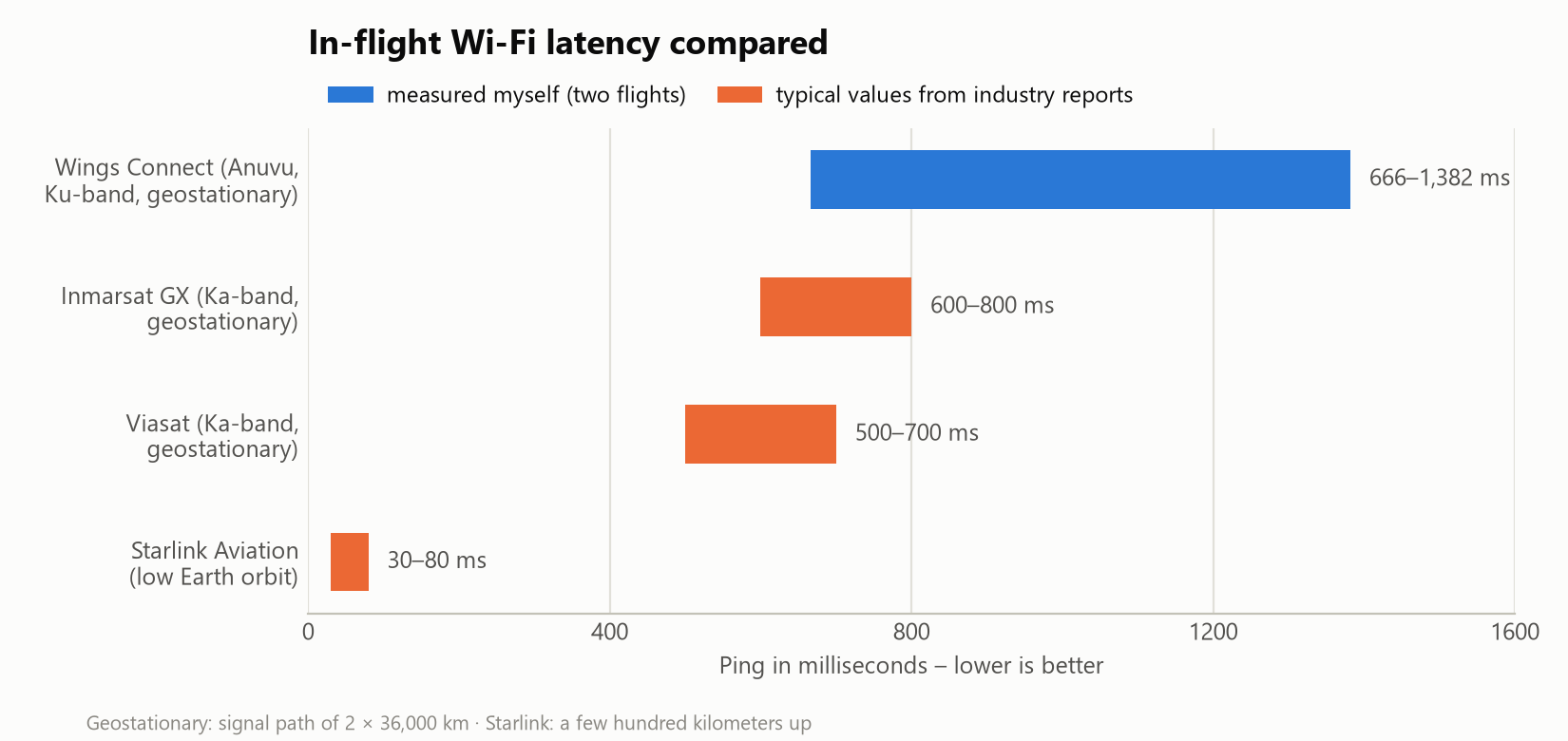
On both of my aircraft (an A320 and an A321), Wings Connect is presumably powered by Anuvu with a geostationary Ku-band satellite; the contract partner in the portal is T-Mobile HotSpot GmbH with its “HotSpot Inflight Service”. Geostationary means the signal travels 36,000 kilometers – twice. So it is pretty clear that, for purely physical reasons, nothing below 500 to 600 milliseconds of response time is possible. Depending on the flight, the packages usually cost between 2.90 and 9.90 euros; I had the premium package for the entire flight at 9.90 euros.
Patience required
| Metric | Flight 1: DUS→ACE (March) | Flight 2: BCN→DUS (October) |
|---|---|---|
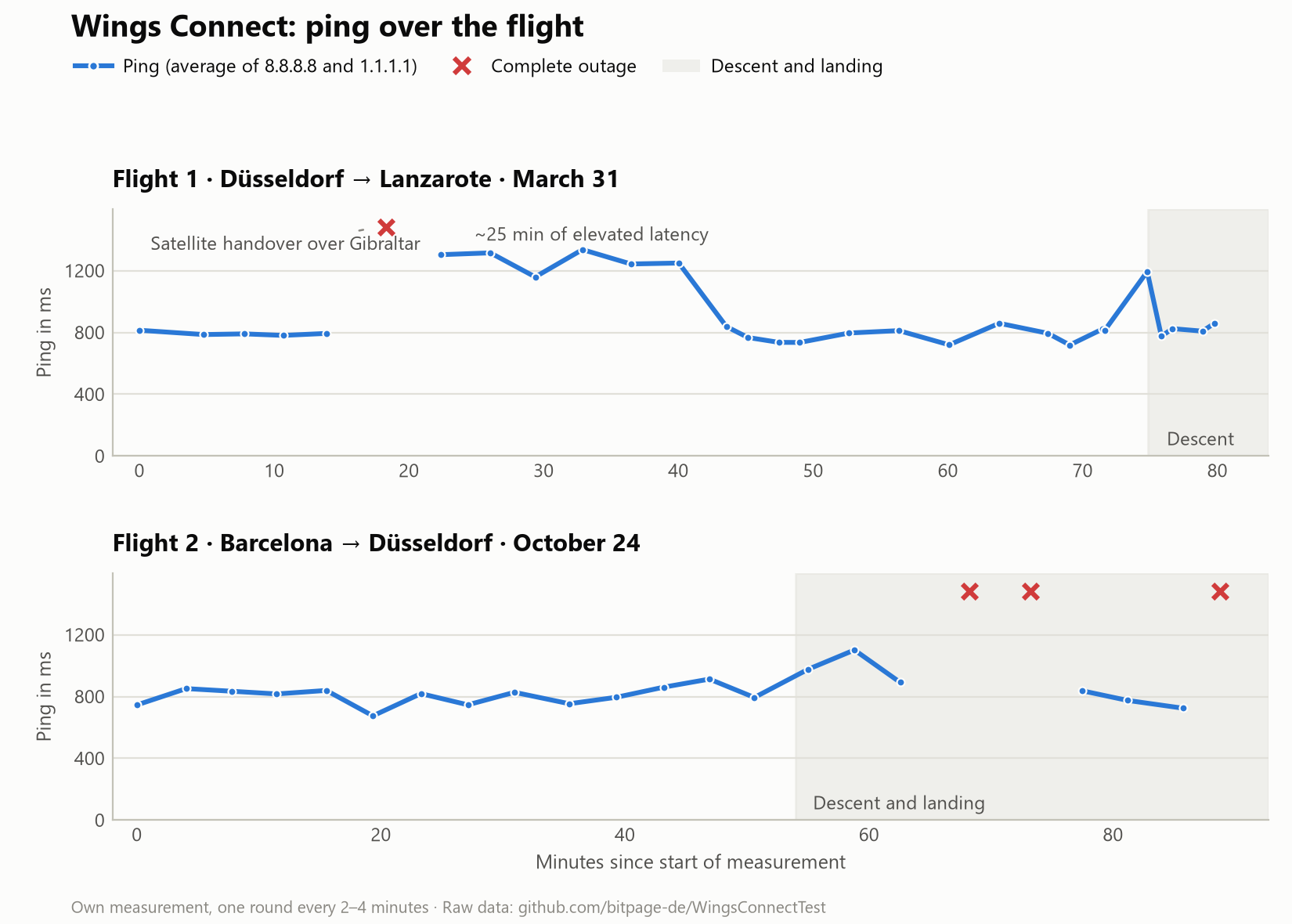
| Ping | 683–1,382 ms | 666–1,124 ms, median 824 ms |
| Packet loss | 0–10%, 30–60% during the satellite handover | 16% on average, three complete outages |
| DNS resolution | 0.2–5 s | 0.2–8.2 s |
| First response on page load | 2.1–6.9 s | 2.0–8.3 s |
| Download | 0.05–1.31 Mbit/s | median 1.17 Mbit/s |
| Upload | 0.07–0.72 Mbit/s | median 0.47 Mbit/s |
A median of roughly one megabit per second is the (rural) DSL level of twenty years ago, with considerably more latency on top. A normal web page takes 3 to 10 seconds, a 100 MB download would take about 20 minutes, give or take. And everything fluctuates wildly: DNS resolution varies by a factor of 40, and the download dropped to 0.05 Mbit/s at times. What I found interesting: the upload was often almost as fast as the download. With satellite connections this is normally highly asymmetric, too.
No internet over Gibraltar
The most exciting moment on my Lanzarote flight: right over Gibraltar the connection vanished completely and only trickled back in. That is where the aircraft switches from European to Atlantic satellite coverage, and this handover cost more than just a minute or two. For around 25 minutes afterwards, latency sat at 1,100 to 1,400 milliseconds instead of the usual 750. On my return flight from Barcelona the outages came during descent instead: at 12,000 feet, everything went dead twice. Funnily enough, on final approach at 3,000 feet the connection delivered a full 1.2 Mbit/s one more time before it was over for good while taxiing to the gate. During the approach my laptop was, of course, dutifully closed and stowed in my bag under the seat in front of me, hoping it would not die a heat death.
What is the onboard internet good for?
Messaging and email work very reliably – the connection is easily good enough for that. Browsing the web works if you bring some patience, and text-based services run surprisingly well. Streaming, on the other hand, is a lost cause (SD video needs at least 1.5 Mbit/s, and that never arrives reliably), and so are video calls (at 800 milliseconds of latency, people constantly talk over each other). The only way to get moving pictures through the pipe is the download option of your streaming provider in SD quality. But you have to ask yourself whether it is worth clogging up your internet access above the clouds for an hour to download a single episode of your favorite show.
What others report
Inside digital tested Wings Connect back in 2018 and measured 16 to 17 Mbit/s of download on two flights – albeit on aircraft with Inmarsat satellite technology. For Reisetopia on a long-haul flight, the Wi-Fi was fast but steep in price (both articles in German).
I understand that people are quick to complain when they are used to very different speeds on the ground. But it should be put into perspective how much complex technology it takes to get online in the air. After all, the data covers thousands of kilometers, and still it is only a few seconds of waiting. By the way, this is exactly what surfing via modem over the phone line used to feel like. Back then you were happy when your emails got fetched and sent. Today it is your WhatsApp messages – in mid-air.
Starlink is coming
Since August 19, 2026, the first Lufthansa A320neo has been flying with Starlink in regular service, and by 2029 around 850 aircraft of the group are to follow – explicitly including the subsidiary Eurowings. Eurowings promises the fast internet “on all routes and aircraft”, with the retrofit said to have started in the second half of 2026. Details on pricing are still open. Starlink satellites orbit at a few hundred kilometers instead of 36,000. That pushes latency down to 30 to 80 milliseconds at bandwidths of 50 to 200 Mbit/s. Should I ever be lucky enough to test Starlink on a retrofitted Eurowings aircraft, there will definitely be an update here.
Verdict
Wings Connect via Anuvu satellite is a connection from another era: enough for WhatsApp, email and a bit of patient browsing – do not expect more. Loading your phone up with video streams before boarding remains the way to go, unless the inflight portal’s movie selection appeals to you. It should also be said that these measurements were taken from one laptop in one seat and are not representative – consider them an indication rather than anything else. If you want to dig deeper, you will find all the raw data in the accompanying GitHub repository.
What are your experiences with Wings Connect? Feel free to share them in the comments.
This post is also available in:  Deutsch





'/%3E%3C/svg%3E)